
Audi A4 S4 RS4 B8 LHD RHD 2008-2016 10-Inch Screen Radio Upgrade


- Availability: In Stock
- Model Number: 1004-A4
Introducing our latest aftermarket GPS navigation head unit, designed specifically to replace the factory LCD screen unit in the Audi A4/S4/RS4 LHD from 2008-2016. With the same plug-and-play connector and wiring harness as the original radio, installation is quick and easy. This product replaces only the original Audi A4/S4/RS4 LHD LCD screen unit while retaining the original factory FM/CD unit, so the factory Audi computer/CD/FM/AM/Sirius/XM will continue to function normally.
With the same wiring and connector as the original radio, installation is as simple as plug-and-play. Once installed, you'll have a smart entertainment system with touch screen/navigation/FM/AM/USB/Wi-Fi/AUX-IN/Bluetooth phone/Bluetooth music/DAB+ (tuner optional)/rearview camera (camera optional)/Apple CarPlay/Android Auto/TV (tuner optional)/OBD (device optional)/Google Play, and more.
Upgrade your Audi A4/S4/RS4 LHD with our GPS navigation head unit and enjoy a new level of entertainment and convenience while driving. Don't miss out on this opportunity to transform your driving experience.
Compatible Vehicles:
Audi A4 B8 (Type 8K: 2008 2009 2010 2011 2012 2013 2014 2015 2016)
Audi S4 B8 (Type 8K: 2009 2010 2011 2012 2013 2014 2015 2016)
Audi RS4 B8 (2012 2013 2014 2015)
Before placing an order, you need to know the following items about your car:
1. What is the current radio system on my car?
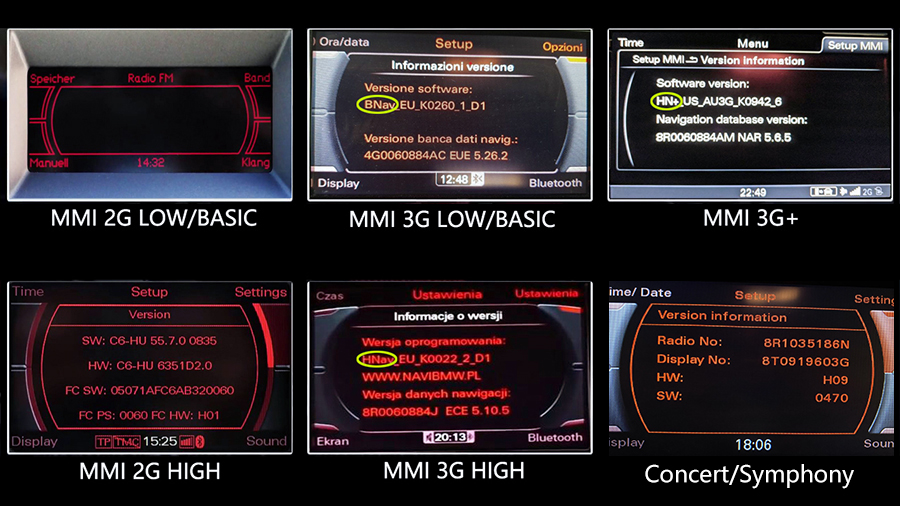
| Audi Radio system | Display | Software version | Fitness |
| Chorus with MMI 2G Low/Basic | 3-inch monochrome display | / | NOT FIT |
| MMI 2G High navigation system | 6.5-inch monochrome display | / | NOT FIT |
| Concert/Symphony basic radio(no navigation) | 6.5-inch TFT color display | / | FIT |
| MMI 3G Low/Basic navigation system | 6.5-inch TFT color display resolution 480*240 | BNAV | FIT |
| MMI 3G/3G+ navigation system | 7-inch TFT color display resolution 800*480 | HN+ | FIT |
| MMI 3G High navigation system | 7-inch TFT color display resolution 800*480 | HNav | FIT |
Send a photo of the dashboard(radio system) to info@sigmacarstereo.com if you are not sure about compatibility.
2. If your car has an MMI system, then you can use the original joystick and touchscreen to operate the new Android screen.
You can still use the original joystick to operate the original Audi screen. The touchscreen does not operate the original Audi screen.
3. Please press the MEDIA button on the radio panel and check the audio source options.
If your car has the AUX(External audio input), you don't need the AMI-AUX cord.
If your car has the AMI, then you need the Audi AMI-AUX adapter cord. Please add it from the add-ons box when placing an order. Otherwise, there will be no audio after installing our product.
To find the Audi MMI version check (2G 3G 3G+ RMC high low basic) click here.
Factory radio system:

Installation Photo:

| Operating system | Android 13 | |
| CPU | 64-Bit 8-Core Cortex-A53 1.5GHz | |
| RAM | 4GB | |
| Capacity | 64GB | |
|
Display Screen Resolution |
10.25" (12.3” optional) Capacitive Touch Screen 1920*720 |
|
| Network | Wi-Fi | |
| SD card | One micro sd card slot | |
| USB port | Three USB ports | |
| Camera Input | One camera input(RCA port) | |
| Microphone | External microphone | |
| GPS receiver | Built-in GPS module and external GPS antenna |
Navigation:
* Free maps preload and free updates
* Stunning 3D visualization
* Text-to-speech direction
* Support Google, Waze, Sygic, etc
Radio:
* Built-in AM/FM tuner
* Support RDS
* Support DAB+(tuner is optional)
* NOT support Sirius/XM radio
Apple CarPlay(optional):
* Support Apple Carplay with iPhone
Android Auto(optional):
* Support Android Auto with an android phone
Bluetooth:
* Hands-free phone call
* Load the phone book from your mobile phone
* Bluetooth music stream A2DP
* Internal Microphone
* Compatible with iPhone & Android mobile
phone
Backup Camera(camera is optional):
* Display reverse image automatically
Once in the reverse
* Sony CCD camera with night vision
SD card/USB:
* SD card/USB music, video, photo, and ebook
* Charge phone via USB port
Front In-Dash camera(camera is optional):
* Support a forward video recorder while driving
* Operate via touchscreen
* Plug & Play
SWC:
* Support original steering wheel buttons control
AUX:
* One channel A/V input for external device
Google Play:
* Android Market provides numerous apps for
download,
such as Skype/MSN/Youtube/Twitter/Facebook
free download as much as you need
Network:
* Wi-Fi


Installation video: https://youtu.be/4yijXT0Wdbw
Audi A4 high-quality system: https://www.youtube.com/watch?v=T8HNyO0N1NY
Is this product plug-and-play? Do I need to program or code my Audi? Do I need to buy an external GPS antenna? Can I still check the car info on the OEM screen?
Answer: Yes, it is totally plug-and-play, it has the same plugs and harness as the original Audi system. You do not need to program your car when installing. All necessary accessories are included in the package. You do not need to buy anything else to make it work. You can still check the original Audi car info as before.
How do I switch the new upgrade system to the original Audi interface?
Answer: Please tap the “Original” icon on the home screen to switch to the original Audi interface.
How do I switch the original Audi interface to the new upgrade system?
Answer: Please tap the screen.
Why it shows a black screen with no signal when tapping “Original” to switch back to the original Audi interface?
Answer: Please check the CAR-LVDS port. Make sure you connect the LVDS plug (removed from the OEM screen) to the new screen.
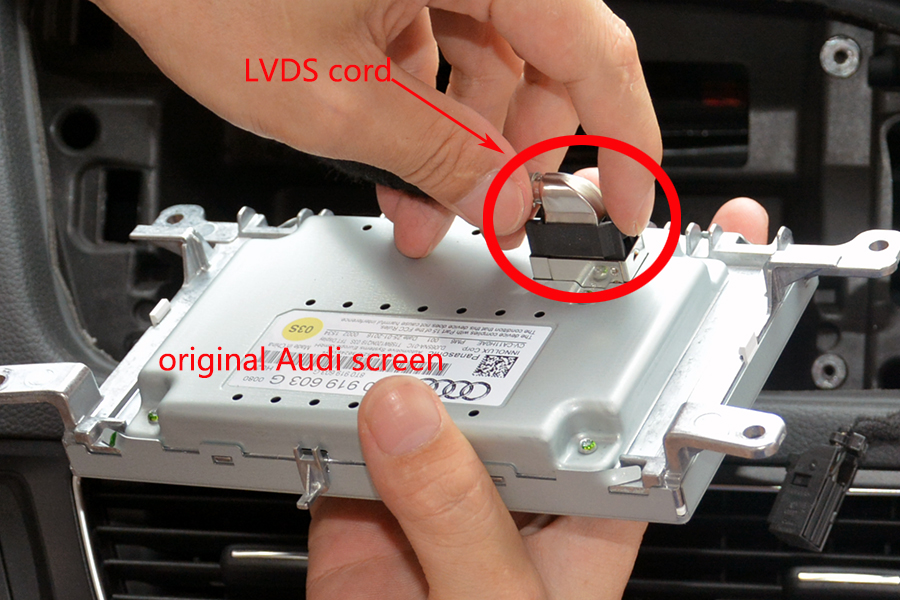
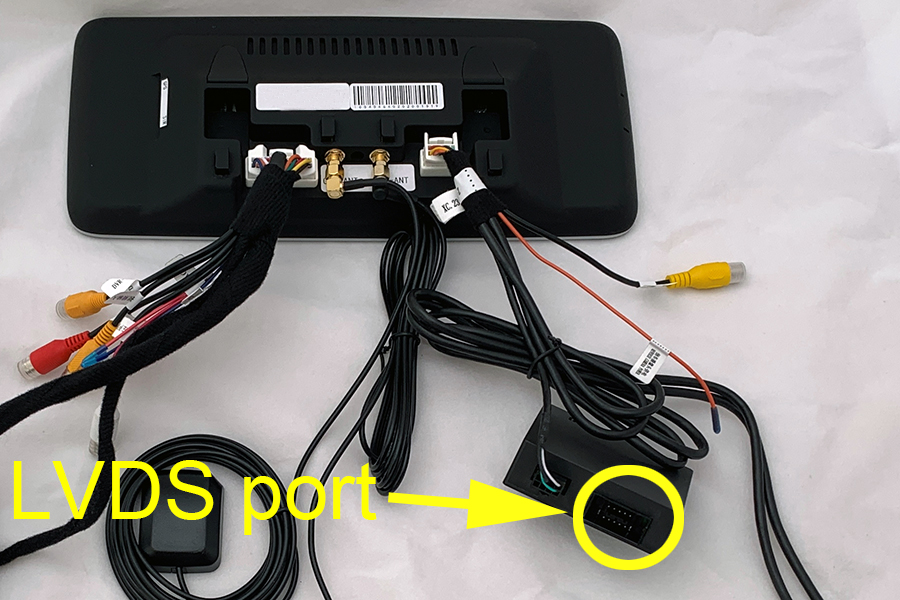
Why there is no audio from the new upgrade system?
Answer:
1. Please press the MEDIA button on the radio panel and check the audio source options. Make sure the External Audio input(AUX) is activated.


Note if your car has the AMI option instead of AUX, then you need to plug the Audi AMI-AUX cord(this cord is sold separately) into the AMI port in the glove box on the passenger side. After plugging this cord, the AMI will change to AUX on the screen.

2. Then tap the screen to access the new upgrade system. You should be able to hear sound.
Where should I mount the main metal box? The original LVDS cord is too short to mount in the glove box?
Please take apart the glove box on the passenger side and there is a hole that allows you to put the metal box hide behind the screen. Then the LVDS cord is long enough.


The T harness that plugs into the side behind the glovebox is not the right connection. photo here
Answer: Please check the attached wiring diagram here. Connect them to the CAN BUS plugs at the rear of the A/C controller panel.

I am getting TPM And and airbag error on my dash now, I assume it's due to that T harness not being plugged in.
Answer: You need to keep the original airbag/hazard button connected to the aftermarket T harness and hide it into the dash. Please check the attached picture here.
Lastly, I am not getting any audio when using CarPlay. Navigation and consoling my phone wirelessly works but no audio coming out of the speakers. It stays on the radio or CD player.
Answer: Please access the original AUDI menu and select the "AUX" audio option. Then try again.
