
How to Install Porsche Cayenne 2003–2010 Autoradio GPS Aftermarket Android Head Unit Navigation Car Stereo

Upgrading the factory radio in your Porsche Cayenne 2003–2010 is one of the smartest ways to modernize your vehicle without compromising its luxury appeal. An aftermarket Android autoradio GPS head unit brings advanced navigation, Apple CarPlay, Android Auto, Bluetooth, and multimedia features that the original system simply cannot offer.
In this complete installation guide, we’ll walk you through features, compatibility, benefits, step-by-step installation, and buying tips—everything you need to know before upgrading your Porsche Cayenne infotainment system.
Why Upgrade the Porsche Cayenne 2003–2010 Factory Radio?
The original PCM system in early Cayenne models lacks today’s essential smart features. An aftermarket Android head unit completely transforms your driving experience.
Key Reasons to Upgrade
-
Outdated navigation maps
-
No Apple CarPlay or Android Auto
-
Limited Bluetooth functionality
-
Small, low-resolution display
-
No app support (YouTube, Spotify, Google Maps)
An Android head unit solves all these problems while keeping your interior OEM-style.
Where to Buy Porsche Cayenne Android Head Unit
You can purchase a Porsche Cayenne 2003–2010 aftermarket Android autoradio GPS from trusted car stereo upgrade stores.
You can buy from here: https://sigmacarstereo.com/android-head-units/android-head-unit-upgrade-for-porsche/porsche-cayenne-2003-2010-aftermarket-navigation-head-unit-8816
Make sure to choose:
-
Vehicle-specific model
-
CANBUS support
-
BOSE compatibility
-
Warranty & technical support
Compatible Porsche Cayenne Models
This upgrade is designed specifically for:
-
Porsche Cayenne 2003
-
Porsche Cayenne 2004
-
Porsche Cayenne 2005
-
Porsche Cayenne 2006
-
Porsche Cayenne 2007
-
Porsche Cayenne 2008
-
Porsche Cayenne 2009
-
Porsche Cayenne 2010
✅ Supports vehicles with BOSE sound system
✅ Compatible with left-hand and right-hand drive models
Note that the above year range is for your reference only. Send a photo of the dashboard(radio system) of your vehicle to info@sigmacarstereo.com to verify your compatibility if you are unsure about compatibility.
Main Features of Porsche Cayenne Android Autoradio GPS
1. Android Operating System
-
Latest Android OS
-
Access to Google Play Store
-
Download navigation & media apps
2. Built-in GPS Navigation
-
Online & offline maps
-
Google Maps, Waze, iGO, Sygic
-
Real-time traffic updates
3. Apple CarPlay & Android Auto
-
Wired or wireless connectivity
-
Hands-free calls and messages
-
Music streaming and voice commands
4. High-Definition Touchscreen
-
Large HD IPS display
-
Smooth touch response
-
Anti-glare screen
5. Bluetooth & Multimedia
-
Bluetooth hands-free calling
-
Music streaming
-
USB, AUX, SD card support
6. Steering Wheel Control Support
-
Volume, track, and call controls retained
-
Plug-and-play CANBUS integration
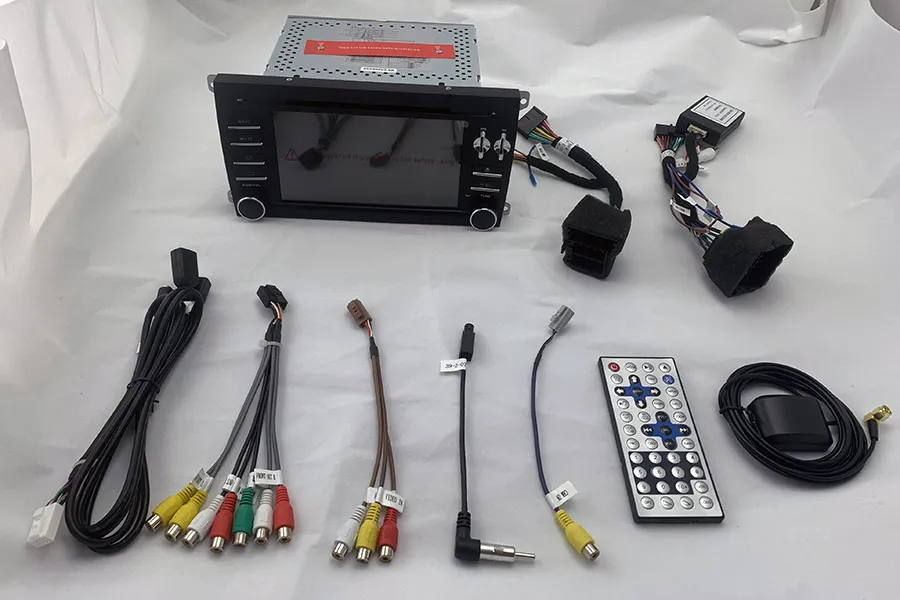
What’s Included in the Package?
-
Android head unit (vehicle-specific frame)
-
Plug & play wiring harness
-
CANBUS decoder
-
GPS antenna
-
USB cables
-
Installation accessories
(No cutting or wire splicing required)
Step-by-Step Installation Guide
For Porsche Cayenne 2003-2010 guidance video, Click here
Step 1: Disconnect the Battery
Always disconnect the negative terminal to avoid electrical damage.
Step 2: Remove the Factory Radio
-
Carefully remove dashboard trim
-
Unscrew the original PCM unit
-
Disconnect factory wiring connectors
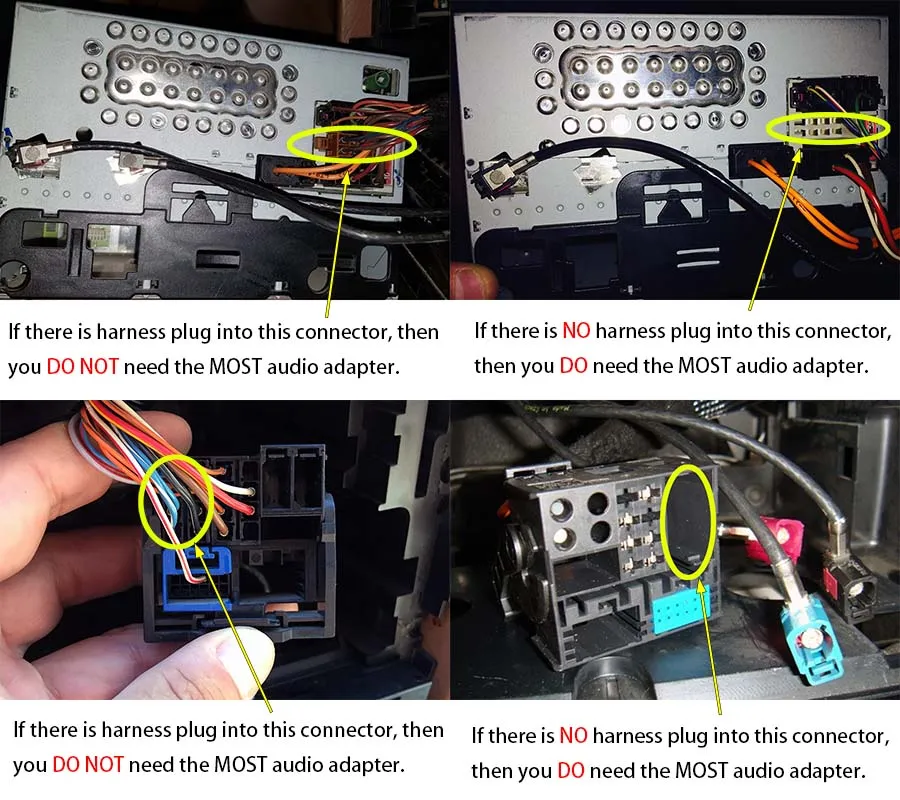
Step 3: Connect the Android Head Unit
-
Plug wiring harness into factory connectors
-
Connect CANBUS module
-
Attach GPS antenna and USB cables
Step 4: Install the New Head Unit
-
Fit the Android screen into the dashboard
-
Secure with screws
-
Reinstall trim panels
Step 5: Test All Functions
-
Navigation
-
Bluetooth
-
Steering wheel controls
-
Sound system
-
Reverse camera (if installed)
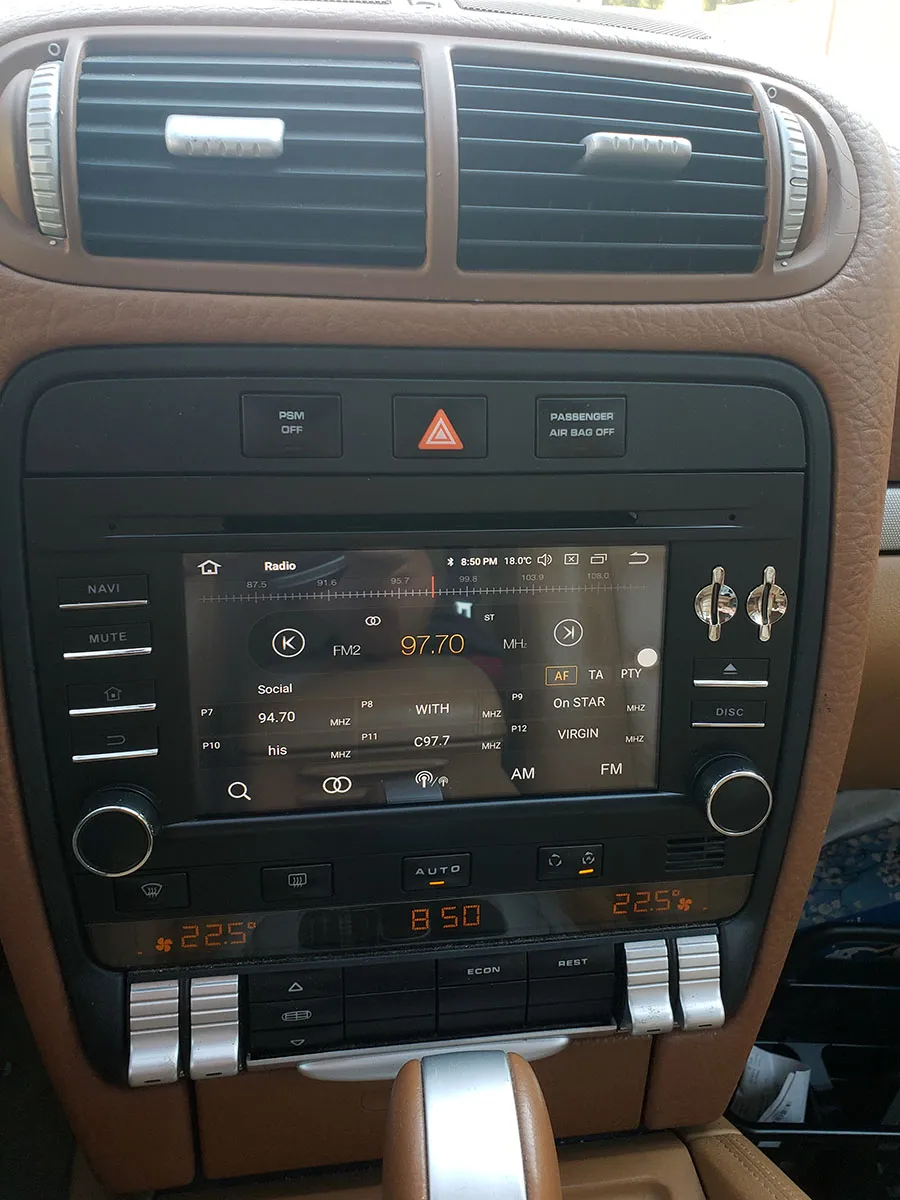
Installation Photo
Retaining Original Vehicle Functions
Your Porsche Cayenne keeps its factory features:
-
✔ Steering wheel buttons
-
✔ BOSE amplifier
-
✔ Factory parking sensors
-
✔ Original backup camera (if equipped)
-
✔ Vehicle system settings
Benefits of Installing an Android Head Unit
-
Modern luxury driving experience
-
Increased vehicle resale value
-
Smart navigation & entertainment
-
Safer hands-free driving
-
OEM-style dashboard finish
Common Installation FAQs
FAQ 1: Is this Android head unit compatible with all Porsche Cayenne 2003–2010 models?
Yes, it is designed specifically for Porsche Cayenne models from 2003 to 2010, including vehicles with BOSE sound systems.
FAQ 2: Does the Android autoradio support Apple CarPlay and Android Auto?
Yes, the system supports both Apple CarPlay and Android Auto, wired or wireless depending on the model.
FAQ 3: Will steering wheel controls still work after installation?
Yes, steering wheel buttons work perfectly using the included CANBUS decoder.
FAQ 4: Do I need to cut factory wires during installation?
No. The installation is 100% plug-and-play with no wire cutting required.
FAQ 5: Can I use the factory or aftermarket reverse camera?
Yes, the Android head unit supports both original and aftermarket backup cameras.
FAQ 6:Is professional installation required?
Not mandatory. It’s plug-and-play, but professional installation is recommended for best results.
FAQ 7:Will it drain my battery?
No. The unit powers off automatically with the ignition.
Final Thoughts
Installing an Android autoradio GPS aftermarket head unit in Porsche Cayenne 2003–2010 is the ultimate upgrade for drivers who want modern technology without sacrificing factory aesthetics. With navigation, CarPlay, Bluetooth, and multimedia all in one system, your Cayenne feels brand new again.
Contact Us for Porsche Cayenne Android Radio Upgrade
WhatsApp: https://api.whatsapp.com/send/?phone=00447591940624
Facebook: https://www.facebook.com/sigmacarstereo
Email: info@sigmacarstereo.com
Website: https://sigmacarstereo.com/
Need help choosing the right model or installation support? Contact us anytime—we’re happy to help!
Leave a Comment