
How to Connect Apple Carplay to Android Head Unit

Nowadays the most practical feature for the aftermarket Android head unit may be adding carplay to the car, compared with just adding navigation system to the car a few years ago. Driving with carplay function is safer and more convenient on the road, because you are able to control music playing, maps and even other apps conveniently by touch screen on the aftermarket screen unit.
Carplay is with Siri voice control, so you can focus on driving and also use the Apple iPhone functions on the display screen at the same time.
When you are planing to upgrade the factory radio system with an Android head unit, adding the carplay option can bring you more convenience and carplay is a cost-effective product.
Is it easy to connect and make carplay working? The answer is yes.
Connect carplay via usb wired connection
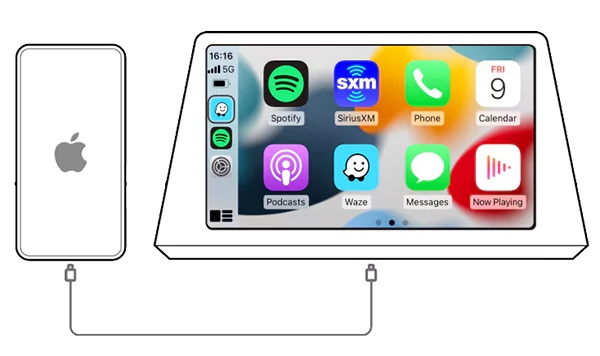
Correct operation steps:
-
Prepare an original USB cable.
Firstly you should prepare a original USB cable for your iPhone, the original USB cable for charging is ok, because some aftermarket USB cables may not be compatible, so we highly recommend you using a original USB cable to connect your iPhone.
-
Connect USB cable.
Connect the USB port end to a USB port from the Android head unit, connect the other end to your iPhone.
-
Click “zlink” carplay app.
This app may also be named “autoplay”, then the screen will display it’s connecting, wait for a few seconds, finally connected successfully.
After you connect them correctly, the carplay interface will be displayed. It may take more time to connect for the first time connection.
Note: you may need to connect your iPhone to the USB OTG port of the an Android head unit, because other USB ports may not be supported)
The above steps are suitable for the unit with carplay built-in, usually there’s an zlink app installed with your android unit.
If your Android head unit does not have carplay built-in, or your carplay does not work well, then you can consider installing an carplay usb box as below:
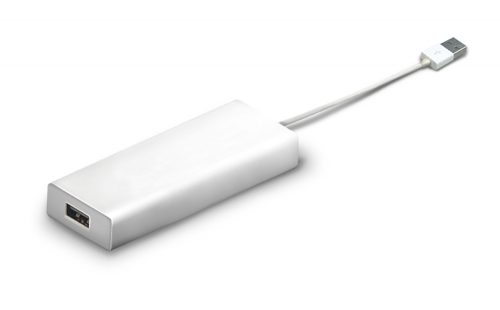
It ooks like a USB device but it’s built-in Apple carplay function which also supports Android auto, so it supports both iPhone and Android phone.
This Apple carplay USB device is compatible with nearly all aftermarket Android head units. If you order our BMW head unit or head units for other cars, and choose this carplay option, we will install AutoPlay app for you while testing before shipping. So after installation of the Android unit, you can easily connect the carplay.
This USB Apple Carplay Adapter Box is US$65, FREE SHIPPING by China post.
If you need, you can contact us via email: info@sigmacarstereo.com
Autoplay apk file download link: http://121.40.123.198:8080/AutoKit/AutoKit.apk
Connect Wirelesss Carplay
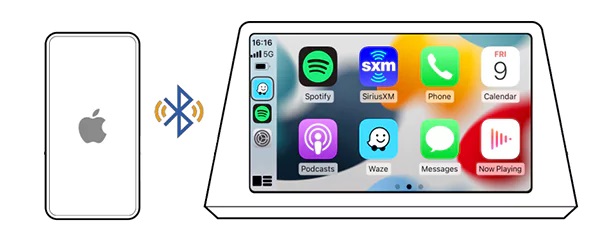
Wireless connection (iphone mobile phone): You just need to connect to androind unit bluetooth, no need to manually connect to the car hotspot.
-
Turn on bluetooth from your iPhone
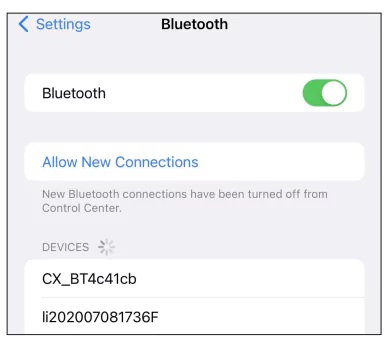
- Choose android device to pair with it
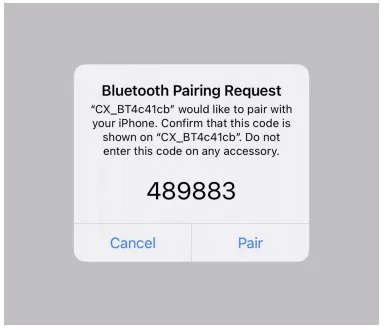
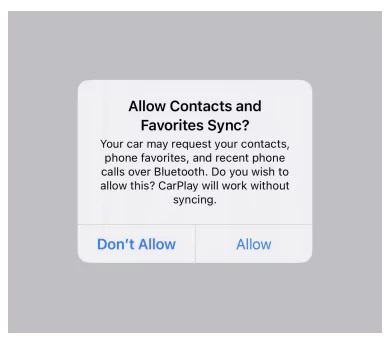
- A prompt window will pop up after the first Bluetooth connection is successful. Make sure to click “Allow”.
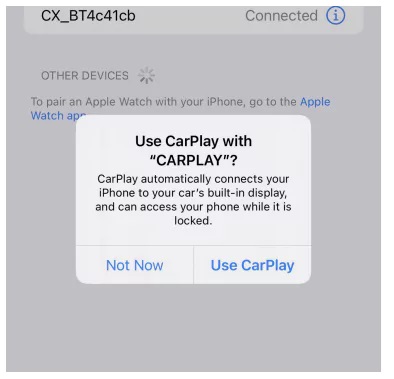
- Click “Use carplay”
- Bluetooth is automatically switched off
After the connection is successful, the devices will display the application screen, and the Bluetooth of the mobile phone will automatically disconnect.
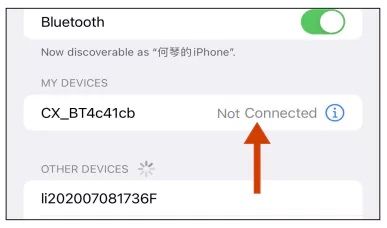
- Successfuly connected with devices displaying interface
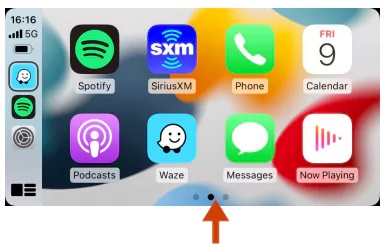
-
Then the Phone WIFI is automatically connected with the devices Hotspot
Important Note: Do not manually connect Bluetooth after Carplay is connected; if you want to use Bluetooth function, please switch off Carplay!
The correct procedures to switch off wireless connection:
- Click the icon of ‘WiFi’ as the picture shows
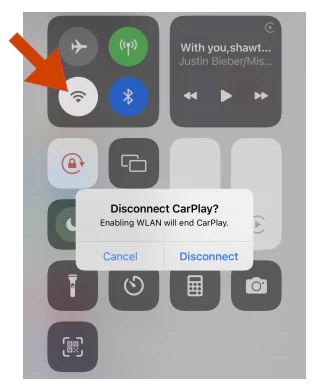
- Popup notice window
- You need to turn off the wifi and turn off the bluetooth function so that it will not automatically connect again
- It is recommended to turn off the bluetooth, when the bluetooth automatically connects successfully,will enter the carplay function again
Trouble Shooting
-
Sometimes ‘wireless connection’ might failed while at other times succeed
It is propobaly due to the incorrect ‘wireless connection’ procedures at the first time of use.
Note: After wireless connection is paired via Bluetooth, Phone WiFi is automatically connecting with the Car Hotspot by protocol. If you try to enter WiFi password to connect
Hotspot before wireless connection succeed , without following correct Bluetooth connection procedures, the Phone will be automatically connected with the saved Car Hotspot everytime you turned on ‘WiFi’ and it may cause wireless Carplay skip the protocol then eventually lead to normal connection of communication fail.Solution:
step 1: Turn on the phone WiFi switch
step 2: Click the name of the connected car hotspot
step 3: Choose to ignore this network
step 4: Reconnect using correct steps
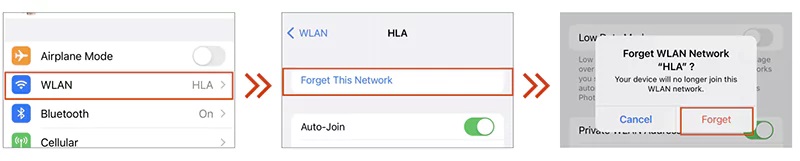
2. Appear to have been unable to connect the phenomenon
Solution:
step 1: Go to “Settings”> “Bluetooth”> “Device Bluetooth name”> “Ignore this setting”> Turn off Bluetooth
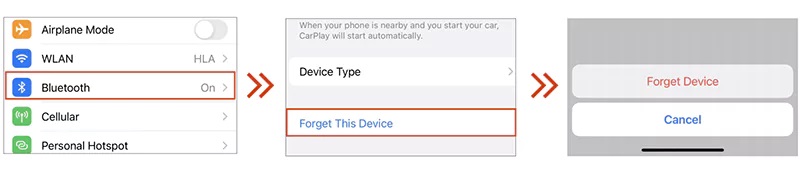
step 2: Go to “Settings”> “General”> “Carplay”> “My Car” on your iPhone, then ignore your car
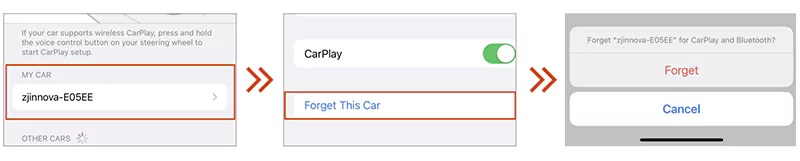
-
step 3: Restart Bluetooth pairing connection
Common problems in the use of carplay
Software support issues
Carplay does not support WeChat, video players, games and other entertainment communication software.
Driving safety issues
- Can carplay project video?
Not supported. To ensure driving safety, carplay does not allow video projection - Can I view the content of new message on carplay?
It will not be displayed in text, but will be broadcast by voice - Why are some software functions incomplete?
In order to ensure driving safety, the content of carplay software will be tailored to retain only necessary functions
Out of sync problem
- When there is a new WeChat message on the phone, does carplay have an alert tone?
The prompt tone will not be synchronized to the mobile phone - Why is carplay playing music out of sync with the mobile phone progress?
Mobile phone iOS13 version and above will not sync
Network problems
- Why does it show no network connection after wireless carplay connection?
Use mobile phone WiFi to communicate with car hotspot during wireless connection, car hotspot has no network, and the mobile phone prompts “the wireless local area network is not connected”, which is a normal phenomenon. - What network does Carplay use after connecting?
Mobile phone network (mobile phone traffic)
Bluetooth related issues
- Why can’t Bluetooth music be played after connecting to carplay?
After carplay is connected, it is forbidden to use Bluetooth-related functions. If you want to use Bluetooth, please disconnect carplay - What should I do if carplay automatically connects when I only want to use Bluetooth?
Before the phone connecting, go to the carplay Settings menu of the device and turn off the “Auto Connect” function.
Connect Carplay with Android phone
You will need to download Android auto app from Google play-store in order to use this carplay device with your Android phone. After you installed the Android auto in your phone, you will need to enter settings, open the developer options, turn on USB debugging, connect the USB cable, allow USB debugging. It may remind you to install some other related google apps, this can help to run the Android auto app properly. The same as connecting carplay with iPhone, you’d better use a original USB cable to connect your Android phone, after connected, you are able to control music playing, maps, and add other apps.
Posted in DVD/GPS Installation
Tagged aftermarket apple carplay, android head unit carplay, install carplay on android head unit
Leave a Comment